Standard Executor
The StateWORKS Standard Executor is a ready RTDB based application with IO-Handlers for some hardware boards.
The installation package contains also the monitor SWMon that allows you to display the hardware inputs and change the hardware outputs. In this article we show an Example specification that demonstrates the possibility of the StateWORKS specification tools: to create an application without writing a single line of code. If you want to try creating your own application, simply download StateWORKS Studio.
Starting the application
Section titled “Starting the application”When starting the Standard Executor via SWExecStandard.exe, you will be asked to provide the configuration file. In this case, we use K8055demo.swd for our board.
The next time the program is started, it will suggest using the last configuration file. You can accept it or enter a new configuration path.
Enter a Configuration file: C:\Users\Public\Documents\StateWORKS Projects \Examples-Web\K8055demo\Conf\K8055demo.swdApplication created with 33 objectsRTDB Server (port 59091) startedTimeBaseTick thread createdFound K8055Unit:001Monitoring Inputs and Outputs
Section titled “Monitoring Inputs and Outputs”To display and change hardware signals you have to start SWMon.exe.
On startup accept the default Host and Port values and leave the Password entry empty (assuming that the default values have been used when starting SWExecStandard).
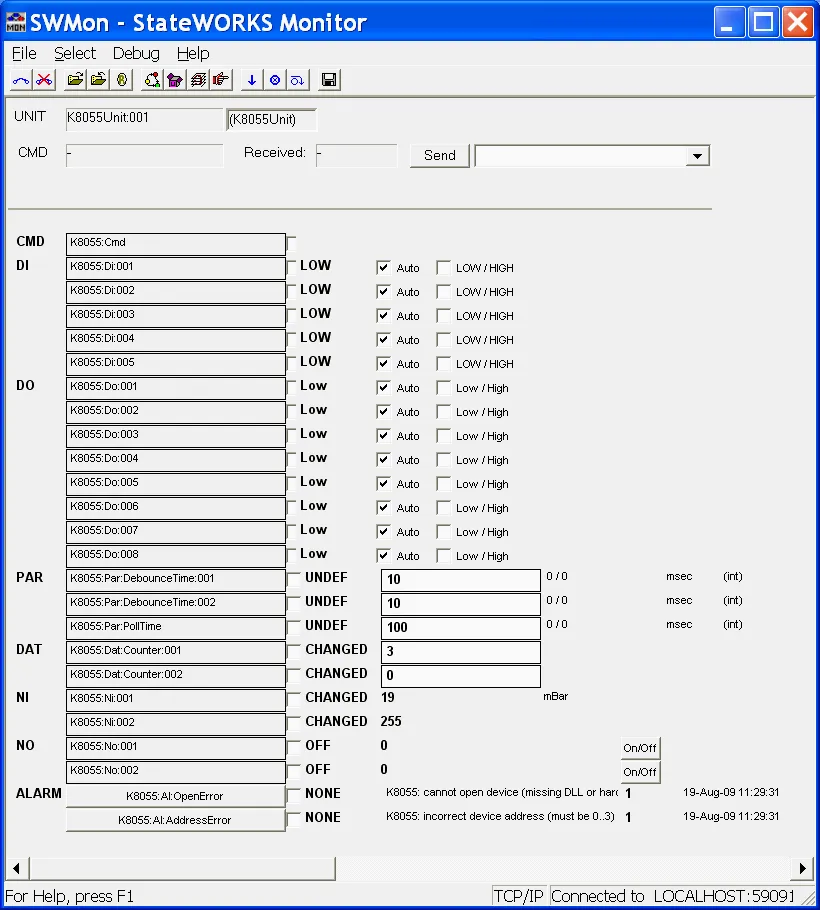
With Select → Unit or using the corresponding icon open the “Select Unit” dialog window where you choose the Unit K8055Unit:001 and confirm it with OK. You should see all inputs and outputs of the board (the screenshot shows all objects of the IO-Handler for the K8055 board). If the board does not exist yet (is not connected), a corresponding alarm will be active.
If you choose VFSM view (Select → VFSM or corresponding icon) you will see all objects that are used in the Example.
The USER view (Select → Objects) displays all objects used in the specification.
If the board is connected its input values (DI, NI) are displayed, and you can set its outputs (DO, NO) using the service (force) mode. If the board is not connected the input values become UNKNOWN (DI) or UNDEF (NI), and a corresponding alarm is generated. You can connect/disconnect the board at any time; the system detects the changes and behaves appropriately.
RTDB objects
Section titled “RTDB objects”Actually you see in SWMon RTDB objects that were used while specifying the IO-Unit for the IO-Handler. That means you see not only the inputs and outputs available on the board but also objects that are required for proper functioning and supervision of the IO-Handler. Especially, you see there a few alarms and parameters (see the description of the IO-Units).
K8055 IO-Unit
Section titled “K8055 IO-Unit”The Unit specifies the interface between the K8055 board signals and RTDB objects. It defines objects shown in this table:
| Object type | Name (K8055 unit) | RTDB object |
|---|---|---|
Digital input DI | Di_1Di_2Di_3Di_4Di_5 | K8055:Di:001K8055:Di:002K8055:Di:003K8055:Di:004K8055:Di:005 |
Digital output DO | Do_1Do_2Do_3Do_4Do_5Do_6Do_7Do_8 | K8055:Do:001K8055:Do:002K8055:Do:003K8055:Do:004K8055:Do:005K8055:Do:006K8055:Do:007K8055:Do:008 |
Numerical input NI | Ni_1Ni_2 | K8055:Ni:001K8055:Ni:002 |
Numerical output NO | No_1No_2 | K8055:No:001K8055:No:002 |
Data DAT | Dat_Counter1Dat_Counter2 | K8055:Dat:Counter:001K8055:Dat:Counter:002 |
Command CMD | Cmd | K8055:Cmd |
Alarm AL | Al_CommErrorAl_AddressError | K8055:Al:AlaCommErrorK8055:Al:AlaAddressError |
Parameter PAR | Par_DebounceTime1Par_DebounceTime2Par PollingTime | K8055:Par:DebounceTime1K8055:Par:DebounceTime2K8055:Par:PollTime |
Several objects are IO-Unit specific:
Cmdis a command sent to the board and could be:AnalogClearAll_Ao4AnalogSetAll_Ao3CloseDevice22CounterResetAll11CounterReset_112CounterReset_213CounterSetDebounceTime_114CounterSetDebounceTime_215DigitalClearAll_Do2DigitalSetAll_Do1OpenDevice21OpenFirstDevice23
AlaCommErroris an alarm generated if the communication with the K8055 board is down.Al_AddressErrorsignals an erroneous physical address of the board (must be 0…3).Par_DebounceTime1andPar_DebounceTime2are debounce time values for inputsDi_1andDi_2that are counted correspondingly byDat_Counter1andDat_Counter2.ParPollTimedefines the value of the polling time loop which queries the K8055 input signals. It can be changed at any time in SWMon.
Example
Section titled “Example”The Example demonstrates a typical control performed by starting a device and supervision of a controlled value (pressure). We assume that the device is switched on by setting a digital input HIGH and the SetPressureValue is a voltage on an analog (numerical) output (representing the required pressure value). The device supplies a digital signal HIGH to a digital input if switched on and a voltage (proportional to the actual pressure value) to the analog (numerical) input. The use of board inputs and outputs is shown in this table:
| Board | Unit | |
|---|---|---|
Digital input DI(Start acknowledgement) | Inp1 | K8055:Di:001 |
Digital output DO(Device On/Off) | 01 | K8055:Do:001 |
Numerical input NI(Pressure) | A1 | K8055:Ni:001 |
Numerical output NO( SetPressureValue) | DAC1 | K8055:No:001 |
There are 3 control phases:
- The first phase begins with the command
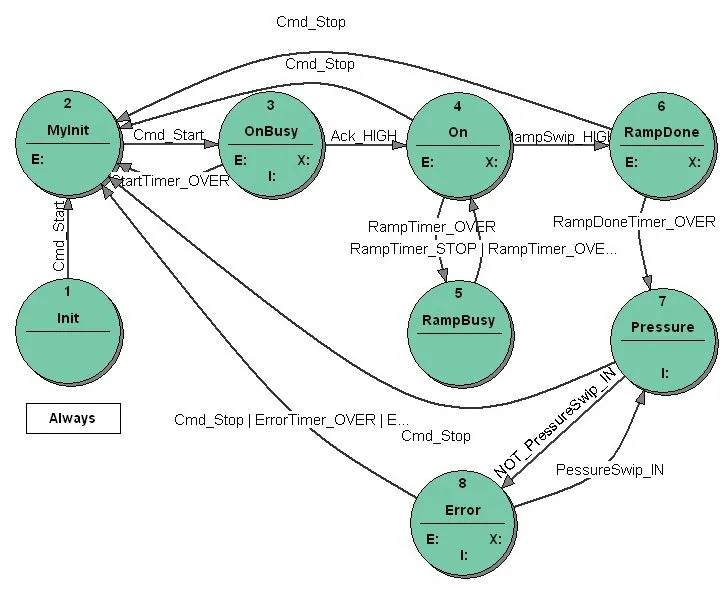
Cmd_Startwhich starts the device. If the device acknowledges its start by setting the digital input toHIGH, the state machine passes to the second phase. The first phase is supervised by a timer whose timeout value is equal to 3 sec. If the timeout elapses before the device acknowledges its start, the state machine should terminate the start-up. - In the second phase a ramp of the
SetPressureValue(required pressure value) is to be generated. TheSetPressureValueshould increase in 100 steps from 0 to 4 V. If theSetPressureValuereaches its nominal value, we should wait 5 seconds to ensure that the pressure has reached its required value, and the third phase should begin. - The third phase is supervision of the pressure value which should stay between maximum and minimum limits. If the pressure leaves the band an alarm should be generated. If this erroneous situation lasts more than 3 seconds the state machine should stop the device. On the other hand the number of pressure errors is limited to 4. Non-compliance with this requirement should stop the device. Every pressure error-free minute should reduce the number of errors by one.
At any time the Cmd_Stop should switch off the device and set the SetPressureValue to 0.
The state transition diagram of the state machine that does the control is shown below. The specification has been done using StateWORKS Studio which is available for download.