
GUI C++ Example
Most applications need some sort of graphical user interface (GUI). The GUI is used to communicate with the program: to set parameters, send commands, display results, show alarms, and so on.
In a StateWORKS run-time system, all application data is stored in the Real Time Data Base (RTDB), which provides a TCP/IP interface for accessing that data. It operates as a server, so a TCP/IP client is needed to communicate with it.
The monitoring programs included in StateWORKS Studio use this interface and therefore act as clients of the data server.
To simplify the development of custom interfaces, we provide a TCP/IP Client library that can be used to build GUIs for StateWORKS applications.
TCP/IP Client Library
Section titled “TCP/IP Client Library”The TCP/IP C++ library contains the TCPIPClient.h file, which contains the declarations of all functions used for building GUI programs:
Initialize() // to store the callback function and environment pointerConnect() // to create the socket and connect to the RTDB serverConnected() // to test whether the client is connectedDisconnect() // to disconnect the client from the RTDB serverRequest() // to get a value of the object property, the actual value is returned as a function parameter and via the event portPoke() // to set a value of the object property, the set value is returned as a function parameterAdviseStart() // to start advise of the object propertyAdviseStop() // to stop advise of the object propertyUnAdviseAll() // to stop adviseThe port created with the TCP/IP library contains two sockets: one for sending Request, Poke, etc. and a second one for events generated by advised objects or in reply to Request.
You can learn the details of the connection from the mainwindow.cpp file. This example has been written with C++ Qt Widgets (6.11.1). Of course, the details of GUI programming will differ on other development platforms. Therefore, we ignore them and concentrate only on the TCP/IP-relevant topics. The description below explains the idiosyncrasies of the library functions in more detail.
The Initialization
Section titled “The Initialization”The Initialize() method, called at program start from the MainWindow constructor, requires two parameters:
- the reference to the callback function
RepEvtused by the event thread run in the TCP/IP client. - the pointer to the owner of the
RepEvtfunction.
The Connection
Section titled “The Connection”The Connect() method, called in OnConnectClicked(), requires two parameters: the server name and the port number. Both parameters have default values, LOCALHOST and 59091 respectively.
The Disconnection
Section titled “The Disconnection”The Disconnect() method, called from the local Disconnect() function, does not take any parameters (actually, it has one parameter, bWithUnadvise, that you can ignore as it has a default value of false). The local Disconnect() function is used twice: in OnDisconnectClicked(), invoked when the user disconnects the client with the Disconnect button, and in the RepEvt function when the server terminates the connection.
Getting a value
Section titled “Getting a value”The Request() method is called several times: in OnConnectClicked(), OnGetClicked() and OnSetClicked(). It should be called after setting a value in the RTDB, as the automatic reply to a write operation is not the actual value but the written value.
The Request() method requires 3 parameters:
- the object name, for instance
Ni:ActualPressureValue, - the object attribute to be read (see Appendix), for instance
IATT_Val, - the reference to a Value variable which will contain the read attribute value.
Setting a value
Section titled “Setting a value”The Poke() method is called in OnSetClicked() and requires 3 parameters:
- the object name, for instance
Ni:ActualPressureValue, - the value to be written, for instance
IATT_Trc, - the object attribute to be written (see Appendix), for instance
.Val.
As mentioned above, it makes sense to follow a write operation with a read, because the value returned during the write operation is not the actual value but the written value (a kind of echo).
Advise an object attribute
Section titled “Advise an object attribute”The advise operation instructs the server to send an event to the client whenever the “advised” object attribute changes. The AdviseStart() method is called in OnAdviseClicked() and requires 3 parameters:
- the object name, for instance
Ni:ActualPressureValue, - the object attribute to be advised (see Appendix), for instance
IATT_Val, - the reference to a Value variable which will contain the just-advised attribute value (for an advise operation, the actual value is returned).
Unadvising an object attribute
Section titled “Unadvising an object attribute”The unadvise operation instructs the server to stop sending events to the client. The AdviseStop() method is called in OnUnadviseClicked() and requires 2 parameters:
- the object name, for instance
Ni:ActualPressureValue, - the object attribute to be unadvised (see Appendix), for instance
IATT_Val.
Note that all method parameters, except the name of the object and the attribute in case of the Poke() method, have default values. If you do not set the attribute value, the functions return without doing anything.
The RepEvt function
Section titled “The RepEvt function”The RepEvt() function cannot belong to the application class (in this case MainWindow). Therefore, when called, it receives a pointer to the environment which lets it use the methods of the application class.
The RepEvt() function is called on the client event thread implemented in the TCP/IP library (not accessible to the programmer). It is called there in 3 relevant cases:
- when the server sends an event with the advised data object,
- when the server restarts the application configuration file,
- when the server exits.
It is also called on reply to a request, but normally we don’t use it for that purpose, since we get the requested value anyway when the Request() function returns.
Example
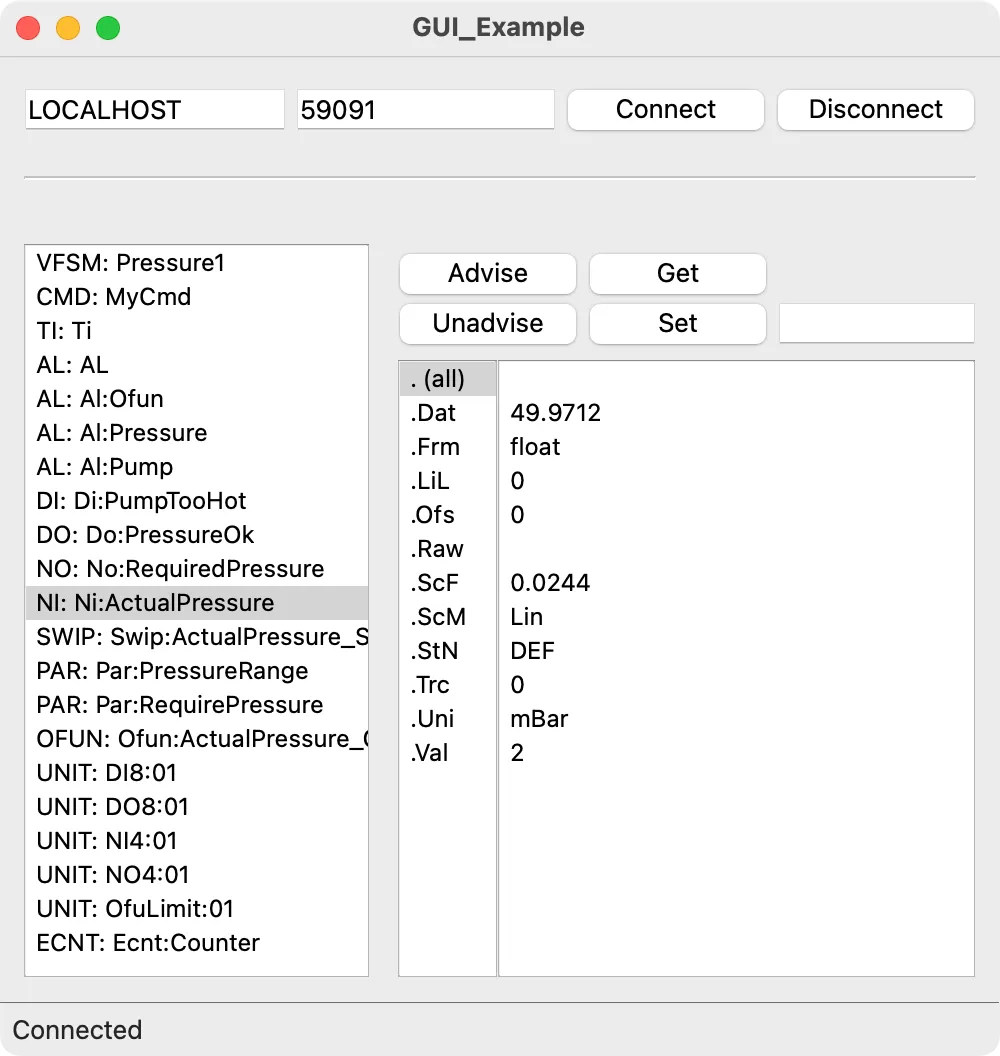
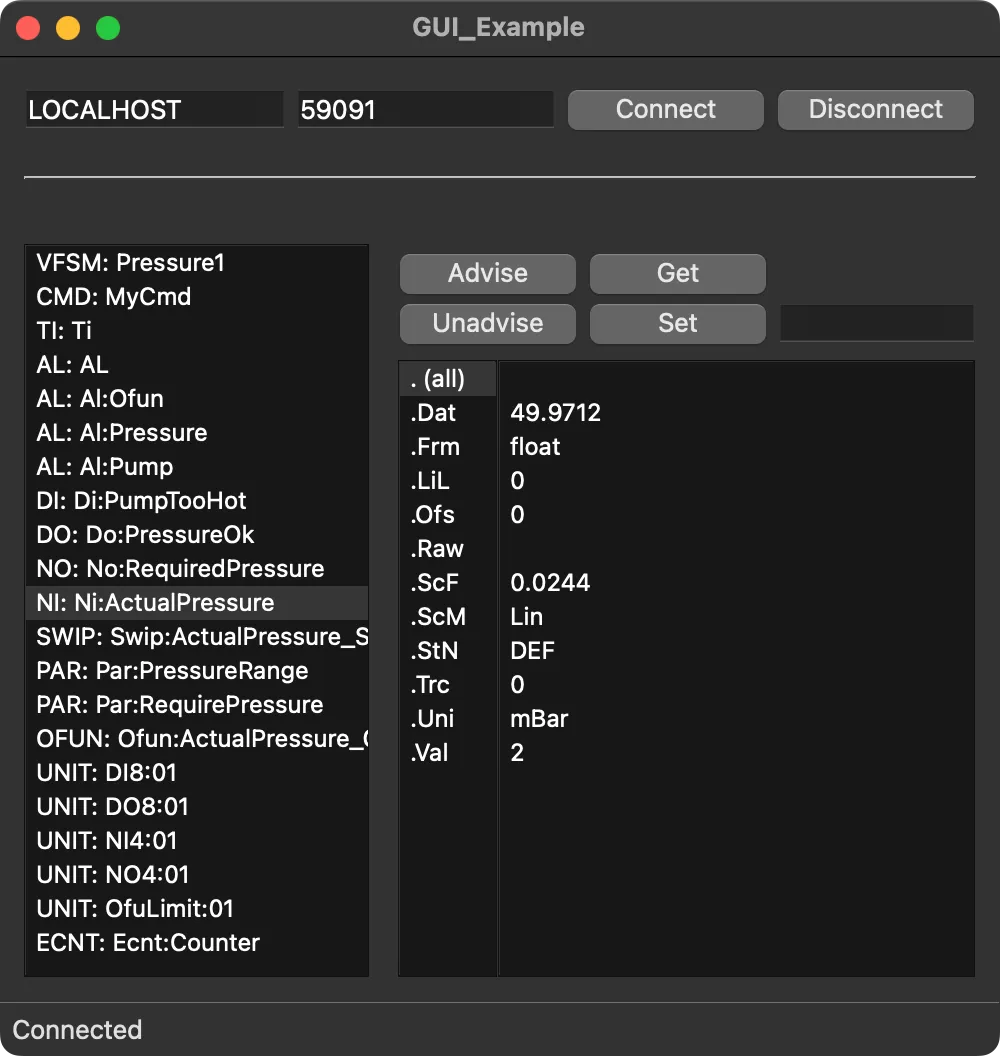
Section titled “Example”The GUI depends on the application. It’s impossible to write something of a general nature, except for Monitors, which offer access to all RTDB data — so the example given here is a kind of Monitor. The source code, provided in the Appendix, shows the usage of the TCP/IP Client functions. In addition to its tutorial purpose, the example displays all object attributes and lets you quickly check the read/write behavior of an attribute: clicking the Get/Set buttons produces a message if the operation isn’t allowed.
Testing
Section titled “Testing”To test the example, start the RTDB server — using SWLab, for instance — and load Pressure.swd. Afterwards, you can connect to the server to monitor the objects.
Summary
Section titled “Summary”With the TCP/IP Client Library, the user gets an important component for linking a Graphical User Interface with StateWORKS run-time systems. This library can also be used to build other kinds of interfaces to communicate with the run-time system.
Appendix
Section titled “Appendix”A.01 mainwindow.cpp
#include "mainwindow.h"#include "ui_mainwindow.h"
#include "const.h"
#include <QMessageBox>
MainWindow::MainWindow(QWidget *parent)    : QMainWindow(parent)    , ui(new Ui::MainWindow){    ui->setupUi(this);
    connect(ui->objectListWidget, &QListWidget::currentRowChanged, this, &MainWindow::OnObjectListSelectionChanged);    connect(ui->connectPushButton, &QPushButton::clicked, this, &MainWindow::OnConnectClicked);    connect(ui->disconnectPushButton, &QPushButton::clicked, this, &MainWindow::OnDisconnectClicked);    connect(ui->getPushButton, &QPushButton::clicked, this, &MainWindow::OnGetClicked);    connect(ui->setPushButton, &QPushButton::clicked, this, &MainWindow::OnSetClicked);    connect(ui->advisePushButton, &QPushButton::clicked, this, &MainWindow::OnAdviseClicked);    connect(ui->unadvisePushButton, &QPushButton::clicked, this, &MainWindow::OnUnadviseClicked);
    ui->statusbar->showMessage("Disconnected");
    // Pass the callback function to TCPIPClient    m_Client.Initialize(RepEvt, this);}
MainWindow::~MainWindow(){    if (m_Client.Connected())        m_Client.Disconnect();    delete ui;}
void MainWindow::OnObjectListSelectionChanged(){    QListWidget *objectList = ui->objectListWidget;    QListWidget *attributeList = ui->attributeListWidget;    QListWidget *receivedList = ui->receivedListWidget;
    // Get selected entry in object list    int selectedRow = objectList->currentRow();    if (selectedRow < 0)        return;    QString item = objectList->item(selectedRow)->text();
    // Get item type    int i = item.indexOf(':');    item = item.left(i); // get item type (string)    for (i = (int) IT_Item; i < (int) IT_last; i++)        if (item == aszItemTypes[i])            break;    e_ItemTypes eType = (e_ItemTypes) i;
    // Copy appropriate attributes to attribute list and initialize received list    attributeList->clear();    receivedList->clear();    for (i = (int) IAtt_None + 1; i < (int) IAtt_last; i++) {        if (abAttribute[i][eType] != a) {            attributeList->addItem(aszItemAttName[i]);            receivedList->addItem("");        }    }    attributeList->addItem(". (all)");}
void MainWindow::OnConnectClicked(){    std::string host = ui->hostLineEdit->text().toStdString();    int port = ui->portLineEdit->text().toInt();
    if (m_Client.Connected())        QMessageBox::information(this, QString(), "Already connected");    else {        if (m_Client.Connect(host, port)) {            ui->statusbar->showMessage("Connected");
            // Get all object names            for (int i = IT_VFSM; i < IT_last; i++) {                std::string itemType = aszItemTypes[i];                std::string objectNames;
                if (m_Client.Request(itemType, IAtt_List, objectNames) == SR_ok && !objectNames.empty()) {                    // One line contains all objects of a given type, separated by LF.                    // Add each object to the list and prepend its object type.                    std::size_t newlinePos;
                    while ((newlinePos = objectNames.find('\n')) != std::string::npos) {                        std::string displayText = itemType + ": " + objectNames.substr(0, newlinePos);                        ui->objectListWidget->addItem(QString::fromStdString(displayText));                        objectNames.erase(0, newlinePos + 1);                    }                }            }        } else {            QMessageBox::warning(this, QString(), "Cannot connect to Server");        }    }}
void MainWindow::OnDisconnectClicked(){    if (!m_Client.Connected())        QMessageBox::information(this, QString(), "Already disconnected");    else        Disconnect();}
void MainWindow::OnGetClicked(){    if (!m_Client.Connected()) {        QMessageBox::warning(this, QString(), "Not connected");        return;    }
    std::string itemName;    QString itemType;    if (!GetItem(itemType, itemName))        return;
    std::string attributeName;    int attributeIndex;    if (!GetAttribute(attributeIndex, attributeName))        return;
    QListWidget *receivedList = ui->receivedListWidget;    std::string attributeValue;    e_ItemAttributes eAttr;
    // . (all) attribute selected    if (attributeIndex == 0) {        for (int i = 1; i < ui->attributeListWidget->count(); i++) {            FindAttribute(MT_Request, i, itemType, eAttr);            if (m_Client.Request(itemName, eAttr, attributeValue) == SR_ok) {                delete receivedList->takeItem(i);                receivedList->insertItem(i, QString::fromStdString(attributeValue).simplified());            }        }    } else {        FindAttribute(MT_Request, attributeIndex, itemType, eAttr);        if (m_Client.Request(itemName, eAttr, attributeValue) == SR_ok) {            delete receivedList->takeItem(attributeIndex);            receivedList->insertItem(attributeIndex, QString::fromStdString(attributeValue).simplified());        }    }}
void MainWindow::OnSetClicked(){    if (!m_Client.Connected()) {        QMessageBox::warning(this, QString(), "Not connected");        return;    }
    std::string itemName;    QString itemType;    if (!GetItem(itemType, itemName))        return;
    std::string attributeName;    int attributeIndex;    if (!GetAttribute(attributeIndex, attributeName))        return;
    if (attributeName == ". (all)") {        QMessageBox::warning(this, QString(), "Cannot set all attributes.\nSelect only one.");        return;    }
    e_ItemAttributes eAttr;    FindAttribute(MT_Poke, attributeIndex, itemType, eAttr);    if (eAttr == IAtt_None)        return;
    std::string send = ui->sendLineEdit->text().toStdString();    if (send == "") {        QMessageBox::StandardButton reply;        reply = QMessageBox::question(this,                                        QString(),                                        "Do you really want to write an empty string (0)?",                                        QMessageBox::Yes | QMessageBox::No);        if (reply == QMessageBox::No)            return;    }
    if (m_Client.Poke(itemName, send, eAttr) == SR_ok) {        // The value returned by Poke is not the value really written        // Therefore we read it        e_ItemTypes eType = IT_Item;        for (int i = IT_Item; i < IT_last; i++) {            if (itemType.compare(aszItemTypes[i]) == 0)                eType = (e_ItemTypes) i;        }        if (abAttribute[eAttr][eType] != aW) {            if (m_Client.Request(itemName, eAttr, send) == SR_ok) {                QListWidget *receivedList = ui->receivedListWidget;                delete receivedList->takeItem(attributeIndex);                receivedList->insertItem(attributeIndex, QString::fromStdString(send).simplified());            }        }    } else        QMessageBox::warning(this, QString(), "Cannot set");}
void MainWindow::OnAdviseClicked(){    if (!m_Client.Connected()) {        QMessageBox::warning(this, QString(), "Not connected");        return;    }
    std::string itemName;    QString itemType;    if (!GetItem(itemType, itemName))        return;
    std::string attributeName;    int attributeIndex;    if (!GetAttribute(attributeIndex, attributeName))        return;
    std::string attributeValue;    e_ItemAttributes eAttr;    if (attributeName == ". (all)") {        for (int i = 1; i < ui->attributeListWidget->count(); i++) {            FindAttribute(MT_AdvStart, i, itemType, eAttr);            m_Client.AdviseStart(itemName, eAttr, attributeValue);        }    } else {        FindAttribute(MT_AdvStart, attributeIndex, itemType, eAttr);        m_Client.AdviseStart(itemName, eAttr, attributeValue);    }}
void MainWindow::OnUnadviseClicked(){    if (!m_Client.Connected()) {        QMessageBox::warning(this, QString(), "Not connected");        return;    }
    std::string itemName;    QString itemType;    if (!GetItem(itemType, itemName))        return;
    std::string attributeName;    int attributeIndex;    if (!GetAttribute(attributeIndex, attributeName))        return;
    e_ItemAttributes eAttr;    if (attributeName == ". (all)") {        for (int i = 1; i < ui->attributeListWidget->count(); i++) {            FindAttribute(MT_AdvStart, i, itemType, eAttr);            m_Client.AdviseStop(itemName, eAttr);        }    } else {        FindAttribute(MT_AdvStart, attributeIndex, itemType, eAttr);        m_Client.AdviseStop(itemName, eAttr);    }}
bool MainWindow::GetItem(QString &itemType, std::string &itemName){    // Get Item    QListWidget *objectList = ui->objectListWidget;    int selectedRow = objectList->currentRow();    if (selectedRow < 0) {        QMessageBox::warning(this, QString(), "Item not selected");        return false;    }    QString item = objectList->item(selectedRow)->text();
    // Partition Item into type and name    selectedRow = item.indexOf(':');    itemType = item.left(selectedRow);    itemName = item.right(item.length() - selectedRow - 2).toStdString();    return true;}
bool MainWindow::GetAttribute(int &attributeIndex, std::string &attributeName){    QListWidget *attributeList = ui->attributeListWidget;    attributeIndex = attributeList->currentRow();    if (attributeIndex < 0) {        QMessageBox::warning(this, QString(), "Attribute not selected");        return false;    }    attributeName = attributeList->item(attributeIndex)->text().toStdString();    return true;}
void MainWindow::FindAttribute(const e_MessageType &eMsgType,                               const int &attributeIndex,                               const QString &itemType,                               e_ItemAttributes &eAttr){    QString attributeName = ui->attributeListWidget->item(attributeIndex)->text();    e_ItemTypes eType = IT_Item;    for (int i = IT_Item; i < IT_last; i++) {        if (itemType.compare(aszItemTypes[i]) == 0)            eType = (e_ItemTypes) i;    }
    // Find attribute    eAttr = IAtt_None;    for (int i = IAtt_None; i < IAtt_last; i++) {        if (attributeName.compare(aszItemAttName[i]) == 0) {            eAttr = (e_ItemAttributes) i;            switch (eMsgType) {            case MT_Request:                if (abAttribute[eAttr][eType] == aW) {                    QMessageBox::warning(this, QString(), QString("%1 property cannot be read")                                                              .arg(aszItemAttName[eAttr]));                    eAttr = IAtt_None;                }                break;            case MT_Poke:                if (abAttribute[eAttr][eType] == aR) {                    QMessageBox::warning(this, QString(), QString("%1 property cannot be set")                                                              .arg(aszItemAttName[eAttr]));                    eAttr = IAtt_None;                }                break;            default:                break;            }            break;        }    }}
bool MainWindow::EventFromServer(QString item, QString value){    // Partition into name and attribute    int separatorIndex = item.indexOf('.');    QString itemName = item.left(separatorIndex);    QString attributeName = item.right(item.length() - separatorIndex);
    // Is item selected?    std::string itemNameSelected;    QString itemType;    if (!GetItem(itemType, itemNameSelected))        return false;    if (itemName != QString::fromStdString(itemNameSelected))        return false;
    // Find attribute in the attributeList    QListWidget *attributeList = ui->attributeListWidget;    int attributeIndex = -1;
    for (int i = 1; i < attributeList->count(); i++) {        if (attributeList->item(i)->text() == attributeName) {            attributeIndex = i;            break;        }    }
    // Display value    if (attributeIndex >= 0) {        QListWidget *receivedList = ui->receivedListWidget;        delete receivedList->takeItem(attributeIndex);        receivedList->insertItem(attributeIndex, value);    }
    return true;}
void MainWindow::Disconnect(){    m_Client.Disconnect();    ui->objectListWidget->clear();    ui->attributeListWidget->clear();    ui->receivedListWidget->clear();    ui->sendLineEdit->setText("");    ui->statusbar->showMessage("Disconnected");}
void RepEvt(int Rep, const std::string &stName, const std::string &stVal, void *pOwner){    MainWindow *pNode = (MainWindow *) pOwner;
    switch (Rep) {    case MT_AdvData:        pNode->EventFromServer(QString::fromStdString(stName), QString::fromStdString(stVal));        break;    case MT_Reply:        break;    case MT_Disconnect:        pNode->Disconnect();        break;    default:        break;    }}
A.02 Attributes
                               CMD    AL    DO    NI   XDA   OFUN  CNT   UNIT  UDC   TAB                                  VFSM   TI    DI    NO   SWIP  PAR   STR   DAT   ECNT        IAtt_None               M  R  R  R  R  M  M  R  R  M  R  R  R  R  R  R  R  M  M.Val    IAtt_Value              M  R  R  R  R  M  M  R  R  M  R  R  R  R  R  -  R  M  M.SvM    IAtt_ServiceMode        M  M  -  -  M  M  -  -  M  -  -  -  -  -  -  -  -  -  -.SvV    IAtt_ServiceValue       M  M  -  -  M  M  -  -  M  -  -  -  -  -  -  -  -  -  -.PeV    IAtt_PeripheralValue    M  M  -  -  R  R  -  -  R  -  -  -  -  -  -  -  -  -  -.VI     IAtt_VI                 R  -  -  -  -  -  -  -  -  -  -  -  -  -  -  -  -  -  -.StN    IAtt_StateName          R  -  R  R  -  -  R  R  R  -  R  -  R  R  R  -  R  R  -.AIL    IAtt_AssocItemList      R  -  -  R  -  -  -  -  -  -  -  -  -  -  -  R  -  -  -.Typ    IAtt_TypeName           R  R  -  -  -  -  -  -  -  -  -  -  -  -  -  R  -  -  -.CnC    IAtt_CountConstant      -  -  M  -  -  -  -  -  -  -  -  -  -  M  -  -  M  -  -.CnR    IAtt_CountRegister      -  -  R  -  -  -  -  -  -  -  -  -  -  R  -  -  R  -  -.Cat    IAtt_Category           -  -  -  R  -  -  -  -  -  -  R  -  -  -  -  -  -  -  -.Frm    IAtt_Format             -  -  -  -  -  -  R  R  -  -  R  -  -  -  R  -  -  R  -.Uni    IAtt_PhysicalUnit       -  -  R  -  -  -  R  R  -  -  R  -  -  -  R  -  -  R  -.LiL    IAtt_LimitLow           -  -  -  -  -  -  -  -  M  -  R  -  -  -  -  -  -  -  -.LiH    IAtt_LimitHigh          -  -  -  -  -  -  -  -  M  -  R  -  -  -  -  -  -  -  -.IVa    IAtt_InitValue          -  -  -  -  -  -  -  -  -  -  R  -  M  -  -  -  -  -  -.Dat    IAtt_DataValue          -  -  -  -  -  -  R  R  R  -  M  -  -  -  M  -  -  M  -.Txt    IAtt_Text               -  -  -  R  -  -  -  -  -  -  -  -  -  -  -  -  -  -  -.Ack    IAtt_Acknowledge        -  -  -  W  -  -  -  -  -  -  -  -  -  -  -  -  -  -  -.Tim    IAtt_Time               -  -  -  R  -  -  -  -  -  -  -  -  -  -  -  -  -  -  -.ScF    IAtt_ScaleFactor        -  -  -  -  -  -  R  R  -  -  -  -  -  -  -  -  -  -  -.Ofs    IAtt_Offset             -  -  -  -  -  -  R  R  -  -  -  -  -  -  -  -  -  -  -.ScM    IAtt_ScaleMode          -  -  -  -  -  -  R  R  -  -  -  -  -  -  -  -  -  -  -.Lst    IAtt_List               R  R  -  -  -  -  -  -  -  -  -  -  -  -  -  -  -  -  -.PAd    IAtt_PhysAddr           -  -  -  -  -  -  -  -  -  -  -  -  -  -  -  R  -  -  -.Com    IAtt_CommPort           -  -  -  -  -  -  -  -  -  -  -  -  -  -  -  R  -  -  -.Trc    IAtt_Trace              M  M  M  M  M  M  M  M  M  -  M  -  -  M  M  -  M  M  -.RMo    IAtt_RunMode            M  -  -  -  -  -  -  -  -  -  -  -  -  -  -  -  -  -  -.NSt    IAtt_NextStep           R  -  -  -  -  -  -  -  -  -  -  -  -  -  -  -  -  -  -
- = noneR = read onlyM = read / writeW = write only